

Umesh Rajashekar , Zhou Wang and Alan C. Bovik
Key Features
Real-time eye tracking, Real-time foveation filtering and real-time display refreshing.
Motivation
The human eye does not perceive the world with a uniform resolution. Resolution (detail) is highest at the point of gaze and falls rapidly towards the periphery. To convince yourself, look at the period at the end of this sentence and try reading the title of this page. This inherent multi-resolution perception of the Human Visual System (HVS) is called ‘foveation’. As a direct consequence of foveation, the HVS has developed a suite of eye movements to direct gaze to various regions in an image and hence build a detailed map of the scene from many variable resolution images.
Since only the region at the point of gaze (in the image/video) has to be retained with high resolution, foveated imaging can potentially reduce the transmission bandwidth (by throwing away resolution at the periphery).
Description of the real-time foveated imaging system
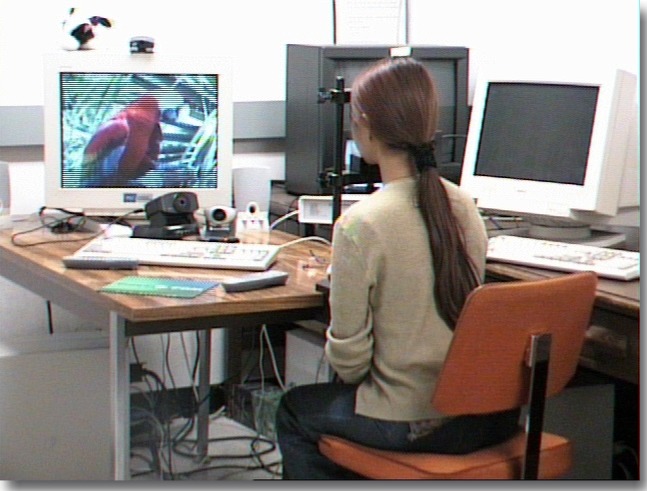
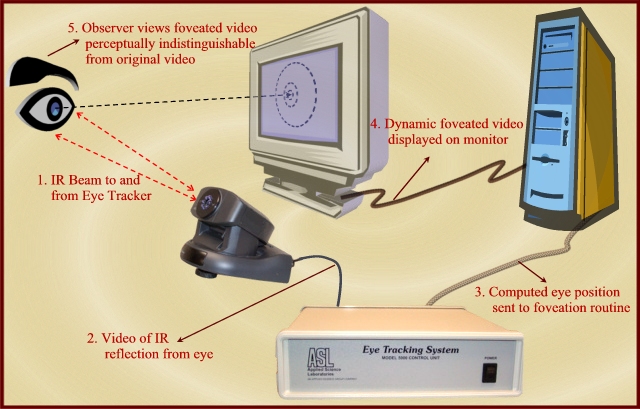
In the summer of 2000, LIVE purchased eye tracking systems that record an observer’s eye movements in real-time. In the Fall of 2001, in tandem with foveation filtering routines developed at LIVE, we built a real-time foveation filtering system to demonstrate the foveation feature of the HVS. The system records observers' gaze direction and automatically 'foveates' the image or video being observed in real time. Since the image/video at the point of gaze is always high-resolution, the foveated display is perceptually indistinguishable from the original to the observer!
The long-term goal of this project is to build a foveated communications test bed by integrating image & video coding blocks and networking protocols. This foveation test bed can then be used in applications like foveated video conferencing system to test the advantages of various encoding schemes and the savings obtained by a foveation scheme. We also envision using this system to track observer’s eye movements while they perform visual tasks like search for applications in psychophysical research.
System Overview
1. Video format - Currently, the system accepts uncompressed YUV files (720*486)in the YUV 4:2:2 (mmioFOURCC YV12) format.
2. Fixation point selection - The gaze position can be specified by the location of a cursor on the screen (mouse-driven). More interestingly, the system is set up for eye tracker-driven mode where the gaze location is fed to the system via an eye tracker.
3. Foveation parameters - The software has an adjustable resolution fall-off which is controlled to match the observer’s distance to the screen
Hardware details
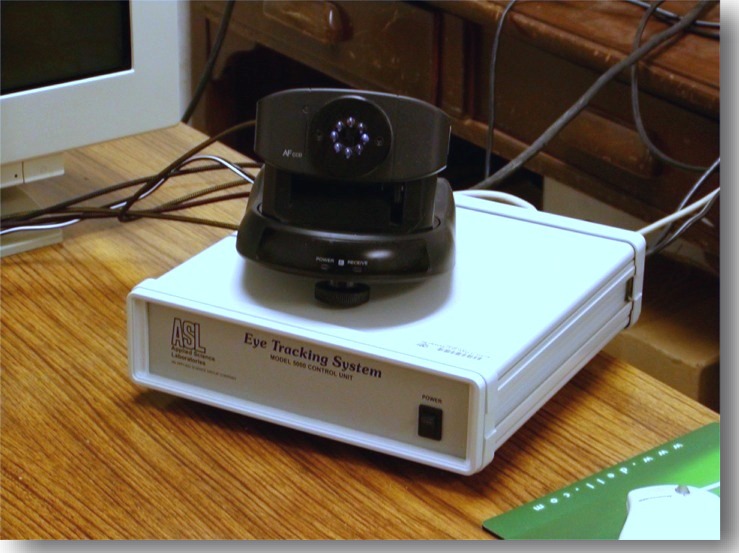
1. ASL 5000 eye tracking system – is a remote eye tracker that is completely unobtrusive to the observer.
2. 1 GHz Pentium 3, 256MB RAM, running Windows 2000 OS
3. AGP RADEON 7200 Graphics card w/ 64MB SDR.
Software details
The program was written using Microsoft Visual C++ 6.0. DirectX was used to handle all display related routines. Hardware conversion from YUV to RGB inherent in the graphics card was utilized to speed up all display routines.
System Block Diagram
Mouse-Driven Foveation: A Test Procedure
1. Foveation filtering – The foveation filtering module dynamically foveates the image in real-time based on the observer’s eye position as well as the depth of foveation controlled manually by the observer. The algorithm is implemented using a bank of low-pass filtering followed by space-variant blending.
2. Observer adjustment – The observer is presented in real-time with a foveated video/image that is dynamically generated during the foveation filtering process. Using the keyboard, the observer has the option to adjust (1) the foveation point; (2) the depth of foveation (resolution fall off in the periphery) to account for the observer’s distance to the screen; (3) to stop or to proceed; (4) to proceed forward or backward; and (5) to proceed continuously or frame-by-frame.
Procedure for Eye Tracker-Driven Foveation
1. Calibration - In the eye-tracking scenario, the first step is to calibrate the observer’s eye position. For this, a calibration screen (shown below) is displayed on the screen and the observer is instructed to look at each dot (from left to right, top to bottom). A linear transformation between the eye position and the screen co-ordinates is estimated and then used to convert gaze position to screen co-ordinates.
2. Verifying calibration – A cursor is displayed at the observer’s (estimated) gaze position. If the observer is satisfied with the calibration, proceed to the actual foveated display. If not, Procedures 1 and 2 are repeated until a good calibration is obtained.
3. Foveation filtering – The foveation filtering module dynamically foveates the image in real-time based on the observer’s eye position as well as the depth of foveation controlled manually by the observer. The algorithm is implemented using a bank of low-pass filtering followed by space-variant blending.
4. Observer adjustment – The observer is presented in real-time with a foveated video/image that is dynamically generated during the foveation filtering process. Using the keyboard, the observer has the option to adjust (1) the depth of foveation (resolution fall off in the periphery) to account for the observer’s distance to the screen; (2) to stop or to proceed; (3) to proceed forward or backward; and (4) to proceed continuously or frame-by-frame.
For a more pronounced effect, the foveated video can also be projected onto a projection screen. We propose to extend this system to include head tracking in tandem with eye tracking.
Acknowledgement
Serial port communication w/ eye tracker – Jeff Perry
DirectX display routines – Andrea (using Jeff Perrry’s code)